I send the quote and then forget to follow up.
Clients go quiet and the enquiry dies in your WhatsApp chats.
Follow-ups sheet
 THINK BRAND FIRSTBUSINESS TOOLS
Buy now ₹299
THINK BRAND FIRSTBUSINESS TOOLS
Buy now ₹299
An interior design quotation format in Excel with a lead, follow-up and payment tracker. Pick items from your rate card, print a clean quote, and see exactly who to call today.
Pay with UPI, cards or net banking via Razorpay. Excel .xlsx files. Digital download: all sales final, see refund policy. Not a GST filing or accounting tool.
These are the problems we hear from Interior Designers. Each one has a sheet in the tracker.
Clients go quiet and the enquiry dies in your WhatsApp chats.
Rates, GST and terms get copied by hand and mistakes creep in.
Material prices change, but nobody tells you a quote is past its validity.
Advance, design approval and material payments are tracked in a notebook.
Instagram, referrals, Google and walk-ins all feel the same.
Budget, taste, timing or a rival: you only guess.
You type in three places: Leads, Quotations and Payments. The Follow-ups list, quote health, balances and the Dashboard are calculated. Works for modular kitchen, wardrobe, false ceiling and full-home quotes.
You get dark and light editions, a clean copy to start with, a sample-data copy to explore first, and a PDF start guide. Payment stages in the sample: Advance, design approval, material on site, handover. You can change all of them.
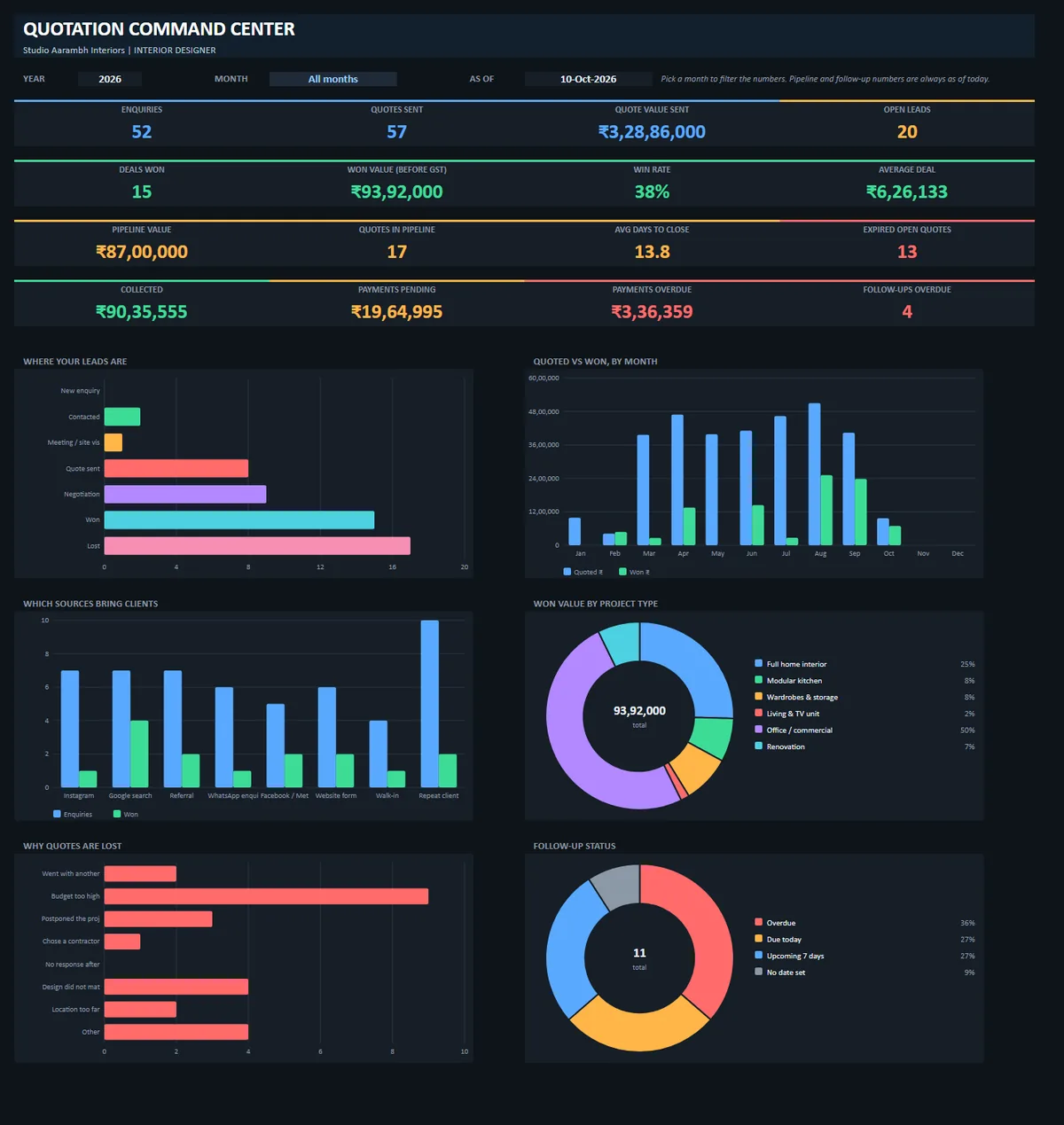
Screens below are the real workbook filled with fictional sample data. Your file starts clean, or you can open the sample-data copy to explore first.
Numbers below come from the fictional sample data inside the file, to show how each sheet works. Yours will use your own entries.
In the sample file, 13 open quotes worth ₹64.0 lakh (before GST) are past their 15-day validity. Each one is a call you should make.
The sample lead list shows 4 overdue, 3 due today, 1 with no date and 3 due this week, in one sorted list.
In the sample, ₹19.6 lakh is still to be collected and ₹3.4 lakh is overdue on 2 milestones.
Of 25 lost quotes in the sample, 9 say budget too high. That tells you to offer phases or a lighter scope.
Enter how many quotes you send, your average quote value and your win rate now. Then choose how many extra percentage points of wins you think better follow-up can bring. This is simple arithmetic with your own numbers, not a promise.
Get the trackerEnter your numbers.
One file instead of notebooks, chats and loose Word quotes.
Assign an owner to each lead and see who has follow-ups pending.
See which sources and project types bring paying clients.
Plain .xlsx, no macros. You can read every formula.
Shared with the buyer's permission.
The dashboard numbers were checked against an independent calculation, and the files were tested in Excel with zero formula errors.
Calculated cells are locked in Excel so they are not deleted by mistake. You type only in the input cells.
No subscription. Your files and your client data stay on your computer.
Stuck with a sheet? Email hello@thinkbrandfirst.com and we will help you set it up.
Excel files (.xlsx) with formulas, dropdowns and charts. It is not an app and it does not connect to WhatsApp or any account automatically. You type your own leads, quotes and payments.
A zip with a dark edition and a light edition of the tracker, a sample-data copy of each so you can explore first, and a PDF start guide.
Yes. The Rate Card sheet holds up to 80 items with your own rate and GST %. The rates in the file are samples. The Quote Builder picks from your Rate Card, or you can type any item with your own rate.
Each Rate Card item has a GST % you can set. The rates and GST percentages in the file are samples, so replace them with your own and confirm the right rate for your work with your chartered accountant. This tool does the arithmetic. It is not tax advice.
No. The Follow-ups sheet gives a WhatsApp link that opens your WhatsApp with a message ready. You press send. There are also 10 message templates you can copy.
Best in Excel on a PC. In Google Sheets the numbers, charts, dropdowns and WhatsApp links work, but the formula lock does not, so be careful not to type over calculated cells there.
In Excel, calculated cells are locked so you cannot delete them by accident. Input cells stay open. To change a formula on purpose, use Review, then Unprotect Sheet. The password is in the guide.
300 leads, 300 quotations and 300 payment rows per file. Save a fresh copy for a new year.
The regular price is ₹499. ₹299 is the Diwali special price.
No. This is a digital download, so all sales are final and there are no refunds once you pay. That is why we show real screenshots and answer questions by email before you buy. Duplicate charges, missing download links and damaged files are fixed: see the refund policy.
Support is by email only. Write to hello@thinkbrandfirst.com from the email you used to buy and include your Razorpay payment id. We aim to reply within 2 working days.
Your download is ready. We have also emailed the link to .
Download the trackerOpen Start-Here-Guide.pdf first, then the file in the LIGHT or DARK folder and fill the Setup sheet. Need help? Email hello@thinkbrandfirst.com.